To begin cancelling your Tinder subscription, find your order number in the confirmation email: MK means Apple, GPA means Google Play, and TNDR (or COSU) means you paid Tinder directly by card. Pick the matching section below, because canceling on the wrong platform won’t stop the charges.
Cancel through Apple (order number starts with MK)
If you subscribed in the Tinder app on an iPhone or iPad, Apple bills you and you must cancel in iOS Settings.
- Open your Settings
- Tap your name at the top
- Tap Subscriptions
- Find and select the Tinder subscription you want to cancel
- Tap Cancel Subscription
If you paid with Apple Pay or a web payment method, follow the Tinder.com steps instead — those options are rolling out in select markets.
Cancel through Google Play (order number starts with GPA)
If you signed up in the Tinder app on Android, Google Play handles your billing.
- Open the Google Play app
- Tap your profile icon in the top right
- Go to Payments & Subscriptions, then Subscriptions
- Select the Tinder subscription you want to cancel
- Tap Cancel subscription
Cancel on Tinder.com or via direct card (order number starts with TNDR)
If you bought on Tinder.com, or paid by credit card or PayPal directly through the Android app, cancel in your Tinder payment account.
- Go to tinder.com and log in
- Tap your profile icon
- Select Manage Payment Account
- Find the subscription you want to cancel
- Tap Cancel Subscription
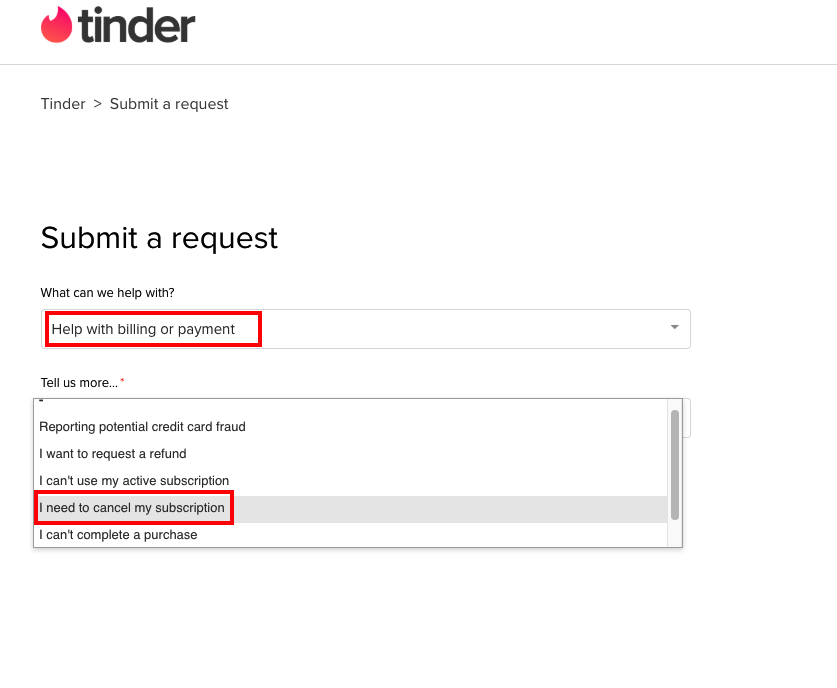
- If that doesn’t work, go to https://www.help.tinder.com/hc/en-us/requests/new where you can manually request a cancellation by providing details about your account or a billing reference code.
Paid by PayPal or credit card through the Android app? You can also do this in the Tinder app under Manage Payment Account.
What happens after you cancel
Canceling stops the automatic renewal — subscriptions renew automatically until you cancel — but it doesn’t end your access early. You keep Tinder Plus, Gold, or Platinum for the remaining days you’ve already paid for.
A few things worth knowing about your money:
- Charges for in-app purchases are generally nonrefundable, with no credit for partially used periods.
- Tinder may make an exception if you request a refund within 14 days of the transaction date, or where local law requires it.
- Apple-billed (MK) refunds must be requested from Apple; Tinder can’t issue them.
- Google Play (GPA) and direct-card (TNDR) refunds go through Tinder’s contact form.
Finally, deleting the app or your account does not cancel your subscription, and subscriptions don’t transfer between platforms — so if you switched from an iPhone to an Android (or the reverse), cancel on the device you originally subscribed on.